Showing posts with label software. Show all posts

Friday, May 30, 2008

Digsby -- The Ultimate Windows Chat Program?

I feel bad. I've been using a program called Digsby (site) for a few weeks now, and haven't had a chance to to through a review here on my site. So, I dedicate this blog to Digsby, and hope that all will benefit. Unless otherwise noted, all pictures are from the official Digsby site.

What is Digsby?

Digsby is a multiprotocol chat client developed for Windows. It integrates all of your chat and email addresses into one simple-to-use program that allows you to chat with whomever on a variety of chat protocols. These include Gmail chat (my favorite), MSN, Yahoo, AIM, ICQ, Jabber, and even Facebook Chat (this is not perfected yet. Facebook's chat protocol is ever changing, and so updates are necessary continuously. It still works. Although I hate facebook's chat.). In addition, you can add email addresses to your account that are constantly updated through your "buddy list". It includes support for Gmail, Yahoo, Hotmail, and any other service that provides POP or IMAP access. It also includes support for social networking, including facebook, myspace, and twitter.

How does it work?

Digsby puts this all together in a customizable, skinnable buddy list. Alerts by default pop up in the lower left hand corner of your monitor, and include friend updates from your social network, emails, and messages. The chat protocol is rock solid, and even supports things like pictures, file transfer, voice chat, and other important protocols. It doesn't support hand writing for MSN Messenger and probably misses a few other features that the full-fledged versions might have. However, this is far from a deal breaker for me. I never use those features and find that the simplified version of chatting that Digsby provides is better and more suited to my chatting preferences.

What does the chat window look like?

The chat window in Digsby can also be skinned and changed. The beautiful thing for me is the ability to TAB conversations. That's right: no matter how many chats you having at the same time, you can open them all in one window, tabbing them for convenience. This is a life saver for anyone on the job, or anyone looking for more screen real estate. This is invaluable for people like me who hate having 400 windows open at the same time and just find it better to keep one program window open and tab the different things that you might be working on (think Firefox, or Notepad++).

Why use it?

There are a multitude of reasons to use it. My primary reason is the ability to stay on top of all things at once, without having to have separate browsers for all my different email addresses, avoiding unnecessary resource usage through multiple chat programs, or simply consolidating my online usage and tracking everything more effectively. There is a very robust preferences pane which allows you to customize the look, sound, and performance of Digsby. Want more alerts? Easy. Want less alerts? Easy as well. Adding protocols is a snap, and signing up for a Digsby profile is simple.

Are their drawbacks?

Sure. Signing up for a Digsby profile stores some information on the Digsby servers. You can use this program between computers without having to add all the different protocols again. This means that some sort of information is stored by Digsby regarding your sign in usernames and passwords. However, this information is stored and protected by the company. Also, as I said earlier, some more advanced features are not supported, and if you are avid user of handwriting, or of gaming with Yahoo messenger, this isn't for you.

Overall: Download the program. Seriously. I love it. It has changed the way I chat and the way that I interact with the web. It's free, fast, dead simple, and super effective. I would recommend this whole-heartedly to everybody on my contact list and everybody who glances at this blog.

Link: http://www.digsby.com/. Just click download now, and select the platform you'd like it for! That simple!

Leave any and all comments in the appropriate and designated location. :)

Thursday, May 22, 2008

GTA IV: Glorious Mayhem


Grand Theft Auto 4 has been released to major critical acclaim. All of the major gaming review outlets have praised the game as simply marvelous, heaping on it the first 10/10 ratings given in the last 10 years (interestingly enough, the last game to receive such high marks was The Legend of Zelda: Ocarina of Time for the Nintendo 64). As a gamer and with a roommate who owns a PS3, we picked up a copy of the game the day that it came out. Having played through about 40% of the actual storyline to this point, I think I can sum it up and provide an accurate picture of just why this games has been so praised by reviewers and gamers alike.

Anyone who knows about video games has heard of the mountains of controversy surrounding the GTA franchise. Purported as a game that supports and even glorifies murder, mayhem, robbery, mobs, gangs, drugs, sex and a partridge in a pear tree, the game is subjected to hours of news coverage whenever it is released and subject to heavy criticism as it breaks every sales record ever established (first week sales totaled over $500 million, which is a certified world record for the largest entertainment launch in history). Why does such a horrid bane on our society sell so well? Why is it received so well critically? Has our society collapsed to the point where this is what people want?

After spending time with the game, I can fully understand the reviews and the criticisms levied for and against the game. Yes, it has more f bombs than any movie ever made. Yes, it is violent. Yes, you can kill civilians and cops. Yes, you work for the mob. Yes, you steal lots of cars. But the reality of the game is that so much care and thought has been put into every detail that it is impossible to hate the game. The first time I rode around listening to the radio, dialed up my cell phone to identify the song, careened through traffic at high speeds, shooting out the window and some thug who I was supposed to chase down, running from the cops with a three-star rating, I was hooked. I know, it sounds ridiculous, but let me sum it up.

Graphics: Impressive for a game of this scale. The game has a HUGE map, and plenty of areas to explore. You can climb to the tops of many buildings, set up vantage points, travel through the water or in the air. Call a cab and watch the city go by you. It's amazing. While there are texture issues, and some pop ins, the reality is that for a game designed with so much detail and on such a massive scale, it sure is beautiful.

Sound: The voice acting is terrific. The characters all have depth and emotion built into everything that they are talking about. The soundtrack, as per typical Rockstar style, is magnificent.

Controls: Car physics are loose. Very loose. It allows you to pull full 360's almost on command and spin out whenever and wherever you want. But EVERY car handles differently. I'm not kidding. Get in a "coquette" (GTA's Corvette) and you can fly around, speeding and taking turns with aplomb. Get in a Hummer-like vehicle, and the car is noticeably more sturdy and can take way more hits. It's still relatively quick, but won't keep up with a sports car in a race. The other buttons are well mapped and thoughtfully placed. I have no complaints, except for the half pull on the free aim. I tend to pull to far. :(

Gameplay: This game was designed with so much detail. Like I said, each car is different. You can surf the internet, have relationships with women and men, discover the "statue of happiness" and so many other aspects of the game. You can identify songs by a built-in system that you can call and it will text you the name and artist of the song. You can go to comedy clubs, cabaret shows, play pool, play darts, go drinking, and a myriad of other activities. It's incredible.

Morality: The game is, of course, of very questionable morality. But I've noticed some interesting things: Civilians and cops typically don't die when you shoot them. They fall, and get disarmed. But normally will stand back up and limp off the scene if you let them. You are encouraged to steal cars, heck, required to steal cars, but frequently listen to Niko (your character) apologize after doing it. It's this kind of action that condemns this game in many eyes. However, if playing a video game causes you to go out and commit these heinous acts, you need more help than you are letting on.

Overall, the game really is a masterpiece. Every set piece works together flawlessly, and the game really does draw you in. If you are a gamer, you really owe it to yourself to pick up this game. It is a fun time, and allows you to truly experience a video game, rather than just sit in front of it.

However, if you are offended by language and other questionable acts, I'd recommend foregoing it.

Comments on the game? That's what the "comments" section is for!

Wednesday, May 14, 2008

Sage (First Impressions)

So, I just downloaded and installed Sage, a feed aggregator designed to work within Firefox. I have some quick first impressions to share:

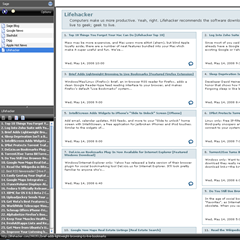
Sage Screen

  1. Well Designed: The aggregator is simple and its use is very intuitive. I had it installed, and got feeds added to it quickly. Just click the feed tag on the bar and off you go!
  2. Quick: It is a simplified reader, and runs very quickly. It loads feeds fast, and organizes them simply as well.
  3. Opens feed in browser: This is a little different. When you click a feed, it opens it in your browser window in squares all over. The unread ones appear first. Alternatively, you can view them in the sidebar, below the feed itself, but that provides no real summary.
  4. Exactly what it should be: It appears that Sage is no more or less than what it should be: a simple, no-frills feed reader extension for Firefox. It really allows me to see my feeds quickly.

I am satisfied with Sage to this point. After a few more hours of use, I'll update my impressions.


Updated (11:50 a.m.): I found how to turn off the rendering in the "content pane". It makes Sage even that much more enjoyable. It only opens them in the sidebar, and you can hover over those and it will describe more of the post for you. Then, by right clicking, you can open in a new tab or whatever fits your fancy. You can mark all as read at a time and even mark all as unread. that's a nifty little benefit that you can get in the program itself. I like that.

Here's the download link (in case you wanna give it a run): Sage Download Page


Updated (5/15/08: 12:16): I just noticed Lifehacker's post on the 5 best RSS readers that went up today. Sage is amongst them. I've actually used them all, except the MacOS one, and find that Sage is by far my favorite for its ability to run from right within Firefox and the small memory imprint. It's beautiful. Check it out their post here.

Any tips? Leave them in the comments.